BabyCam App - Download & Monitor Your Baby from Anywhere
Keeping an eye on your baby is a priority for every parent, and the BabyCam - Baby Monitor Camera app is a game-changer. Designed to make baby monitoring effortless and accessible, BabyCam allows parents to watch, listen, and even interact with their baby using two devices. With no need for complex setup or internet connectivity, BabyCam simplifies monitoring while ensuring maximum convenience and functionality. This article will guide you through everything you need to know about BabyCam, including how to download, use, and explore its features and latest updates.
Why Choose BabyCam?
BabyCam stands out among baby monitor apps for several reasons:
Ease of Use: No registration or pairing codes are required. Just press a button on each device, and they connect seamlessly.
Connectivity: Works over the same WiFi network or via WiFi Direct, even without an internet connection.
Feature-Packed: From two-way audio communication to night mode, BabyCam offers a comprehensive set of features.
Affordability: BabyCam is free to use, with an optional Premium upgrade to remove ads for just $1.99.
Cross-Device Compatibility: Watch your baby from Android devices, a web browser, or even your TV via Chromecast.
Download BabyCam App on Your Respective Device
Downloading BabyCam is simple and straightforward:
For Android Users:
Open the Google Play Store on your device.
Search for BabyCam - Baby Monitor Camera.
Click on the app and tap the Install button.
Wait for the app to download and install on your device.
For Other Devices:
Although BabyCam is primarily designed for Android, it can also be accessed on:
PC, iPhone, or iPad: Use the web browser to connect to the baby’s device.
TV: Stream video feeds through Chromecast.
Setting Up BabyCam
BabyCam’s setup process is user-friendly and doesn’t require technical knowledge. Here’s how to get started:
Step 1: Prepare Your Devices
Use one device as the baby’s monitor (e.g., a phone or tablet placed near the baby).
Use the second device as the parent’s monitor.
Step 2: Connect Devices
Ensure both devices are connected to the same WiFi network or use WiFi Direct if no internet is available.
Open BabyCam on both devices.
Press the connect button on both devices. They will automatically pair.
Step 3: Start Monitoring
Once connected, you can watch, listen, and interact with your baby through the app interface.
Features of BabyCam
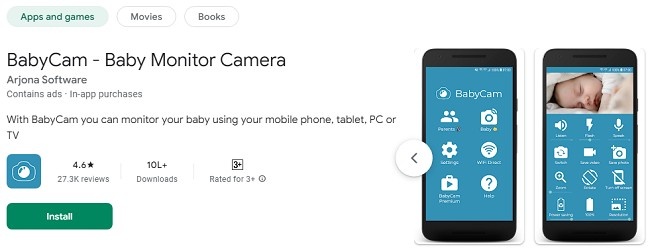
BabyCam offers a wide range of features to make baby monitoring easy and efficient:
1. Live Video and Audio Feed
Monitor your baby in real-time with high-quality video and audio streaming.
2. Two-Way Communication
Talk to your baby through the app’s built-in microphone feature.
3. Night Mode
Activate night mode for a comfortable viewing experience in low-light conditions.
4. Lullabies
Play soothing lullabies directly from the app to help your baby sleep.
5. Camera Controls
Switch between the front and rear cameras, zoom in for a closer view, and adjust the camera’s flash to see in dim lighting.
6. Multi-Device Support
Connect multiple devices to the baby’s monitor. Both parents can watch the baby simultaneously on separate devices.
7. Battery Monitoring
The parent’s device displays the battery level of the baby’s device, ensuring you stay informed.
8. Chromecast Support
Stream your baby’s live feed on your TV using Chromecast for a larger view.
9. Web Browser Access
Access the baby’s monitor from any web browser on a PC, iPhone, or iPad.
10. Media Capture
Take pictures and videos of your baby directly through the app.
Latest Updates
BabyCam continually improves its functionality with regular updates. Here are some of the latest additions:
Enhanced Connectivity: Improved stability for connections over WiFi Direct.
New Lullabies: Added a wider selection of lullabies to soothe your baby.
Battery Optimization: Reduced battery consumption on both devices during monitoring.
UI Improvements: Updated user interface for better navigation and usability.
Premium Features: Option to disable ads forever with a one-time payment of $1.99.
Frequently Asked Questions (FAQs)
1. Is BabyCam free to use?
Yes, BabyCam is free to use. However, you can upgrade to the Premium version for $1.99 to remove ads.
2. Can I use BabyCam without WiFi?
Yes, BabyCam works via WiFi Direct, which does not require an internet connection.
3. How do I connect BabyCam to my TV?
You can use Chromecast to stream your baby’s feed directly to your TV.
4. Does BabyCam work on iPhones?
BabyCam can be accessed on iPhones or iPads through a web browser.
5. Can both parents monitor the baby at the same time?
Yes, multiple devices can connect to the baby’s monitor simultaneously.
6. Is BabyCam secure?
Yes, BabyCam ensures secure connections within the same network, eliminating risks from external access.
7. What happens if the baby’s device runs out of battery?
The parent’s device displays the battery level of the baby’s device to prevent this situation.
8. Can I take photos or videos of my baby using BabyCam?
Yes, you can capture pictures and record videos directly through the app.
Conclusion
BabyCam - Baby Monitor Camera is a reliable and feature-rich app designed to simplify baby monitoring. Its ease of use, connectivity options, and wide array of features make it an excellent choice for parents. Whether you’re a first-time parent or an experienced caregiver, BabyCam ensures peace of mind by keeping you connected with your baby at all times. Download BabyCam today and experience the convenience of modern baby monitoring!
Trending Now
Updates